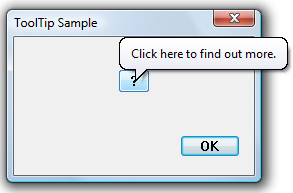
In the Windows XP login screen, the password text box will warn you with a balloon tooltip if you accidentally turn Caps Lock on. The balloon tooltip appears to be a Windows tooltip common control with the TTS_BALLOON style.
To replicate this functionality, I decided to write a function called ShowMsgBalloon() which, given a control and the various balloon tooltip parameters, creates and shows the balloon tooltip below the control.
The key insight to making ShowMsgBallon() work as intended was to use the TTF_TRACK option to create a tracking tooltip. This will immediately show the tooltip without requiring the user to position the mouse over the control. The main downside to using TTF_TRACK is that the tooltip will not move with the control if the window is moved; you need to manually move the tooltip using TTM_TRACKPOSITION as required. One could probably make this automatic by subclassing the tooltip’s parent control and handling WM_WINDOWPOSCHANGED messages.
Here is the source code to ShowMsgBalloon(). When you are done with the balloon, call DestroyWindow() on the returned HWND. Note: you may want your application to use comctl32.dll version 6 as it will lead to a nicer visual style, including a close button.
#include <windows.h>
#include <commctrl.h>

// Options to ShowMsgBallon() (see dwOpts parameter). These are the
// standard icon types for balloon tooltips.
#define SMB_ICON_INFO (1 << 0)
#define SMB_ICON_WARNING (1 << 1)
#define SMB_ICON_ERROR (1 << 2)

// Given the options passed to ShowMsgBalloon(), determine what
// parameter to send to TTM_SETTITLE for the balloon tooltip's icon.
static DWORD
GetTitleIcon(DWORD dwOpts)
{
    if (dwOpts & SMB_ICON_INFO)
        return TTI_INFO;
    else if (dwOpts & SMB_ICON_WARNING)
        return TTI_WARNING;
    else if (dwOpts & SMB_ICON_ERROR)
        return TTI_ERROR;
    else
        return 0;
}

// Create and show a balloon tooltip immediately below the control
// hwndCtrl with the given title, message, and options.
HWND
ShowMsgBalloon(HWND hwndCtrl, LPCTSTR szTitle, LPCTSTR szMsg,
               DWORD dwOpts)
{
    HWND hwndRet = NULL;
    HWND hwndTT = NULL;
    TOOLINFO ti = { 0 };
    RECT rc;

    // Even though TTS_CLOSE is always specified, a close button will
    // only be shown if your application has a manifest that requires
    // comctl32.dll version 6.
    hwndTT = CreateWindow
        (
        TOOLTIPS_CLASS,
        TEXT(""),
        WS_POPUP | TTS_NOPREFIX | TTS_BALLOON | TTS_CLOSE,
        CW_USEDEFAULT, CW_USEDEFAULT,
        CW_USEDEFAULT, CW_USEDEFAULT,
        hwndCtrl,
        NULL,
        NULL,
        NULL
        );
    if (hwndTT == NULL)
        goto Cleanup;

    // By using TTTOOLINFO_V1_SIZE rather than sizeof(TOOLINFO),
    // we don't require users to be using comctl32 version 6.
    ti.cbSize = TTTOOLINFO_V1_SIZE;
    ti.uFlags = TTF_TRACK;
    ti.hwnd = hwndCtrl;
    ti.lpszText = const_cast<lptstr>(szMsg);
    if (!SendMessage(hwndTT, TTM_ADDTOOL, 0, (LPARAM) &ti))
        goto Cleanup;
    if (!SendMessage(hwndTT, TTM_SETTITLE, GetTitleIcon(dwOpts),
                     (LPARAM) szTitle))
        goto Cleanup;

    // Position the tooltip below the control
    if (!GetWindowRect(hwndCtrl, &rc))
        goto Cleanup;
    SendMessage(hwndTT, TTM_TRACKPOSITION, 0,
                MAKELONG(rc.left + 10, rc.bottom));

    // Show the tooltip
    if (!SendMessage(hwndTT, TTM_TRACKACTIVATE, TRUE, (LPARAM) &ti))
        goto Cleanup;

    hwndRet = hwndTT;
    hwndTT = NULL;

Cleanup:
    if (hwndTT != NULL)
        DestroyWindow(hwndTT);

    return hwndRet;
}
Update 2008-11-01 3:08PM: If you are targeting comctl32.dll version 6 or later, I recommend using the EM_SHOWBALLOONTIP message. Comctl32.dll version 6 or later also automatically shows the caps lock warning balloon for edit boxes with the ES_PASSWORD window style.